Computer Institute Dynamic Website – Complete Website Package with Domain & Hosting
Launch your own professional Computer Institute website with a dynamic PHP-based system, powerful admin panel, course m…
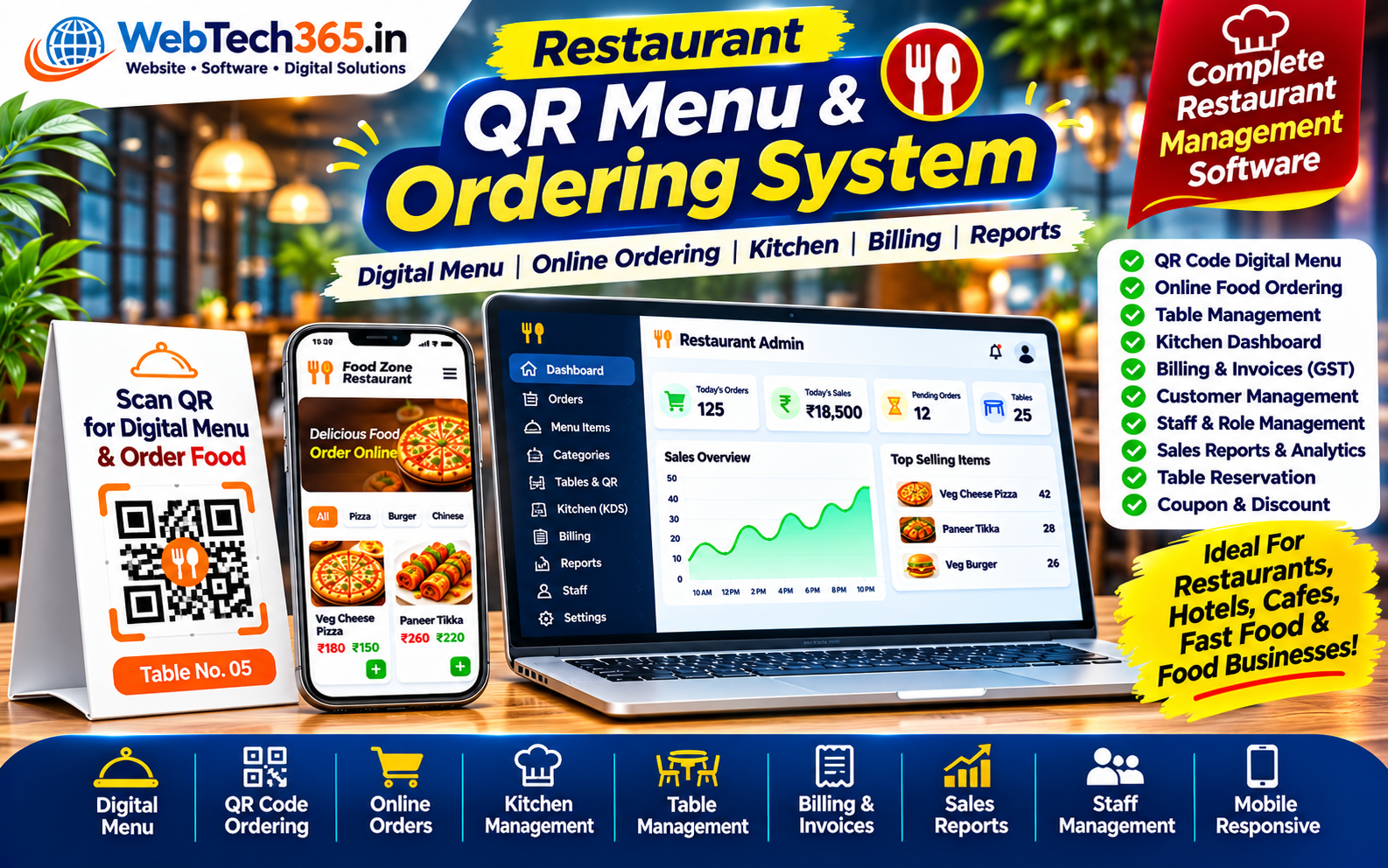
Transform your restaurant with a complete QR Code Digital Menu and Online Food Ordering System. Allow customers to scan table QR codes, browse food menus, add items to cart, and place orders directly from their smartphones. Manage food items, tables, orders, kitchen operations, billing, payments, and sales reports through a powerful Admin Panel. Ideal for Restaurants, Hotels, Cafes, Fast Food Shops, and Food Businesses.
# Restaurant QR Menu & Ordering System
## Complete Digital Restaurant Management Solution
Modernize your restaurant operations with a powerful and user-friendly Restaurant QR Menu & Ordering System.
This dynamic PHP and MySQL-based software helps restaurants replace traditional printed menus with digital QR code menus and simplifies the complete food ordering process.
Customers can scan a QR code placed on their dining table, browse the digital food menu, select their favorite dishes, add items to their cart, and place orders directly from their smartphones.
Restaurant owners can manage food menus, categories, table information, customer orders, kitchen operations, billing, payments, and sales reports through a centralized Admin Panel.
## 1. Digital QR Code Menu
- Generate unique QR codes for restaurant tables.
- Scan QR codes using smartphones.
- Automatically identify the restaurant table.
- Display the digital food menu.
- Browse food categories and items.
- View food images, descriptions, and prices.
- Display Veg, Non-Veg, and Egg food indicators.
- Show food availability.
- Search food items.
- Share digital menu links.
## 2. Food Menu Management
- Add, edit, and delete food categories.
- Add and manage unlimited food items, subject to hosting capacity.
- Upload food images.
- Manage food descriptions and prices.
- Set discounted prices.
- Manage Veg / Non-Veg food types.
- Set food preparation time.
- Manage featured food items.
- Enable or disable food availability.
- Manage food sizes and variations.
- Configure extra toppings and add-ons.
## 3. Online Food Ordering System
- Customer-friendly shopping cart.
- Add and remove food items.
- Increase or decrease quantities.
- Select food variations.
- Select additional toppings.
- Add special cooking instructions.
- Automatic subtotal calculation.
- Configurable taxes and charges.
- Customer checkout form.
- Unique order number generation.
- Order confirmation page.
## 4. Multiple Order Types
Support different restaurant ordering methods:
- Dine-in Orders.
- Takeaway Orders.
- Home Delivery Orders.
For Dine-in orders, customers can place orders using the QR code assigned to their restaurant table.
## 5. Order Management System
- View all customer orders.
- Receive new orders in the Admin Panel.
- Accept or reject orders.
- Update order preparation status.
- Manage pending orders.
- Manage completed orders.
- View customer information.
- View table-wise orders.
- View order details.
- Search and filter orders.
- Print order details.
## 6. Kitchen Display System (KDS)
A dedicated Kitchen Dashboard helps kitchen staff manage incoming food orders.
- Separate Kitchen Staff Login.
- Display new orders.
- Accept orders.
- Start food preparation.
- Display food item quantities.
- View special cooking instructions.
- Mark orders as Ready.
- Track order preparation status.
- Automatic order updates.
## 7. Restaurant Table Management
- Add and manage restaurant tables.
- Assign table numbers.
- Set table capacity.
- Generate table-wise QR codes.
- View available tables.
- View occupied tables.
- View table-wise orders.
- Manage table reservations.
- Download and print QR codes.
## 8. Billing and Invoice Management
- Generate customer invoices.
- Print bills.
- Download PDF invoices.
- Manage payment records.
- Calculate order totals.
- Apply discounts.
- Configure applicable taxes.
- Manage payment status.
- View transaction history.
## 9. Payment Management
- Cash Payment.
- UPI Payment.
- Card Payment Recording.
- Online Payment Gateway Integration (Optional).
- Paid and Unpaid Order Management.
- Transaction Records.
- Payment Reports.
## 10. Customer Management
- Store customer information.
- Customer name and mobile number.
- Customer order history.
- Customer-wise order details.
- Customer search.
- Customer purchase records.
- Guest checkout support.
## 11. Reports and Analytics
- Daily Sales Reports.
- Weekly Sales Reports.
- Monthly Sales Reports.
- Total Orders.
- Completed Orders.
- Cancelled Orders.
- Best-Selling Food Items.
- Category-wise Sales.
- Payment-wise Reports.
- Tax Reports.
- Expense Reports.
## 12. Staff and Admin Management
- Secure Admin Login.
- Restaurant Admin Dashboard.
- Staff Management.
- Kitchen Staff Login.
- Waiter Login.
- Cashier Login.
- Manager Login.
- Role-Based Access Permissions.
## 13. Additional Management Features
- Restaurant Profile Management.
- Logo and Banner Management.
- Restaurant Contact Information.
- Opening Hours.
- Tax Configuration.
- Discount Coupon Management.
- Table Reservation Management.
- Restaurant Expense Management.
- Website Settings.
- Activity Logs.
## Who Can Use This Software?
- Restaurants.
- Hotels.
- Cafes.
- Fast Food Restaurants.
- Pizza Shops.
- Burger Shops.
- Food Courts.
- Sweet Shops.
- Bakery Businesses.
- Family Restaurants.
- Cloud Kitchens.
- Food Service Businesses.
## Why Choose WebTech365?
Get a complete digital solution to simplify restaurant operations, improve customer ordering experiences, reduce manual order-taking, and manage restaurant activities from one centralized platform.
**Digitize Your Restaurant. Simplify Your Orders. Grow Your Business!**
Website: WebTech365.in
### How to Purchase
1. Click on the Buy Now / Enquiry button.
2. Submit your name, mobile number, and email address.
3. Provide your restaurant or business name.
4. Share your restaurant location and contact details.
5. Select your preferred package.
6. Discuss additional features and customization requirements.
7. Confirm the package and payment details.
8. Share your restaurant logo, food menu, prices, and business information.
9. Our technical team will contact you for installation and configuration.
10. Website installation and setup will begin after payment confirmation.
For customization, hosting, or additional integrations, please contact us before purchasing.
**Website:** https://webtech365.in
**Product:** Restaurant QR Menu & Ordering System
### Technical Support
We provide technical assistance for the following:
- Initial Website Installation.
- Admin Panel Configuration.
- QR Code Setup Assistance.
- Restaurant Profile Configuration.
- Food Category and Menu Management Guidance.
- Order Management Guidance.
- Kitchen Dashboard Usage Guidance.
- Basic Billing Configuration.
- Database Setup Assistance.
- Basic Website Troubleshooting.
- Website Deployment Assistance.
**Support Channels:** Phone / WhatsApp / Email.
**Support Timing:** During Business Hours.
**Support Availability:** According to the selected support and renewal plan.
Additional development, customization, and third-party integrations may be chargeable.
### Implementation & Setup Process
1. Collect Restaurant Information and Requirements.
2. Finalize the Selected Software Package.
3. Configure Domain and Web Hosting.
4. Upload Website Files to the Hosting Server.
5. Create and Configure MySQL Database.
6. Install the Restaurant Management Software.
7. Configure Admin Panel Login.
8. Add Restaurant Logo and Business Information.
9. Create Food Categories.
10. Add Food Items, Images, and Prices.
11. Create Restaurant Tables.
12. Generate Unique Table QR Codes.
13. Configure Order Management.
14. Configure Kitchen Dashboard.
15. Configure Billing and Tax Settings.
16. Configure Staff Accounts and Permissions.
17. Test QR Code Scanning and Customer Ordering.
18. Test Order Processing and Kitchen Updates.
19. Perform Final Website Testing.
20. Launch the Restaurant Website.
**Estimated Implementation Time:** 3–7 Working Days after payment confirmation and receipt of all required information.
Actual implementation time depends on customization, content volume, hosting configuration, and additional integrations.
### Customization Services
The Restaurant QR Menu & Ordering System can be customized according to your restaurant's requirements.
Available Customization Options:
- Custom Restaurant Website Design.
- Custom Logo and Brand Colors.
- Custom Food Menu Layout.
- Multiple Food Categories.
- Food Variations and Add-ons.
- Advanced QR Code Design.
- Restaurant Table Management.
- Advanced Kitchen Display System.
- Thermal Printer Integration.
- POS Billing Integration.
- Online Payment Gateway.
- WhatsApp Order Notifications.
- SMS Notifications.
- Home Delivery Management.
- Delivery Staff Management.
- Inventory and Stock Management.
- Supplier and Purchase Management.
- Multi-Branch Restaurant Management.
- Customer Loyalty and Rewards.
- Advanced GST Reports.
- Android and iOS Mobile Application.
Customization charges depend on the requested features, development requirements, and technical scope.
### Software Updates
- Initial Software Installation and Configuration are included.
- Minor implementation-related corrections are covered during setup.
- Bug fixes for covered software functionality are provided according to the support agreement.
- New features and advanced modules may require additional development charges.
- Security and compatibility updates are provided according to the selected maintenance plan.
- Major upgrades and third-party integrations may require additional charges.
- Annual update eligibility is subject to the software licensing and renewal terms.
### Software Licensing Terms
- The software is provided under a single-restaurant and single-domain usage license.
- The license permits installation on one registered domain.
- The customer receives permission to use the software for their own restaurant business.
- Unauthorized redistribution, resale, or sharing of the source code is prohibited.
- The customer can manage restaurant content and operations through the Admin Panel.
- Third-party libraries and integrations are governed by their respective licenses.
- Domain and hosting ownership will be subject to the agreed purchase arrangement.
- Annual support and software update services are subject to renewal terms.
- Expiry of annual support does not automatically disable an already purchased perpetual software license.
- Multi-branch, multi-domain, and extended licensing require separate approval.
Final licensing rights and source code ownership will be specified in the purchase agreement.
### Product Delivery Details
**Product Type:** Digital Software / Restaurant Management System.
**Delivery Method:** Online Website Installation on the Customer's Domain and Hosting.
**Estimated Delivery Time:** 3–7 Working Days.
**Delivery Includes:**
- Restaurant Website Installation.
- Admin Panel Setup.
- MySQL Database Configuration.
- Digital Menu Configuration.
- Food Category Setup.
- Initial Food Item Configuration.
- Restaurant Table Setup.
- QR Code Generation.
- Order Management Configuration.
- Kitchen Dashboard Configuration.
- Initial Billing Setup.
- Website Testing.
- Admin Panel Usage Guidance.
Delivery time starts after payment confirmation and receipt of all required information and content.
The final delivery scope depends on the selected package and agreed customization requirements.
It is a digital restaurant solution that allows customers to scan a QR code, browse food menus, select food items, and place orders using their smartphones.
Each restaurant table receives a unique QR code. When customers scan it, the digital menu opens with the corresponding table information.
Yes. You can add, edit, delete, and manage food items through the Admin Panel.
Yes. You can upload food images and display them with food names, descriptions, and prices.
Yes. You can create categories such as Pizza, Burger, Punjabi, Chinese, Beverages, and Desserts.
Yes. Customers can scan the QR code, select food items, add them to the cart, and submit their orders.
Yes. New orders are displayed in the Restaurant Admin Dashboard and Kitchen Dashboard.
Yes. A separate Kitchen Dashboard can display new orders and allow kitchen staff to update preparation statuses.
Yes. You can create tables, assign QR codes, and manage table-wise orders.
Yes. The system supports bill generation and invoice printing, with PDF functionality as configured in the package.
Yes. Applicable tax settings can be configured according to restaurant requirements and the supported billing features.
Yes. Takeaway ordering is supported as part of the ordering system.
Home delivery functionality can be configured according to the selected package. Advanced delivery management may require additional development.
Online payment gateway integration can be provided separately using a supported payment provider. Additional gateway charges may apply.
Yes. The customer-facing menu and website are designed to work on smartphones, tablets, laptops, and desktop computers.
Yes. Restaurant information, logo, contact details, and available settings can be managed through the Admin Panel.
No. Customers can access the digital menu directly through their mobile browser by scanning the QR code.
Yes. Staff accounts and role-based permissions can be configured according to the selected package.
Yes. The software can be installed on your domain and compatible hosting account.
Yes. Technical support is available for covered installation, configuration, and operational issues according to the selected support terms.
Yes. Additional features, integrations, and design modifications can be provided at extra charges.
Domain and hosting renewal charges apply according to the selected services. Annual software support and update renewal is governed by the licensing agreement.
Send us your details and requirements. We usually reply within one business day.
Prefer WhatsApp? Chat nowLaunch your own professional Computer Institute website with a dynamic PHP-based system, powerful admin panel, course m…
Launch your own professional Online Education Portal with a complete Learning Management System (LMS). Manage video cou…
A configurable mobile application solution for your customers or business, with your branding.
A QR-based solution that helps local businesses guide happy customers to their Google review page in one scan.